SO-101 XOX

A robot arm that plays tic-tac-toe: how I built it, step by step.

The whiteboard needs a wider screen — here are the notes in order.

◐note

What this is

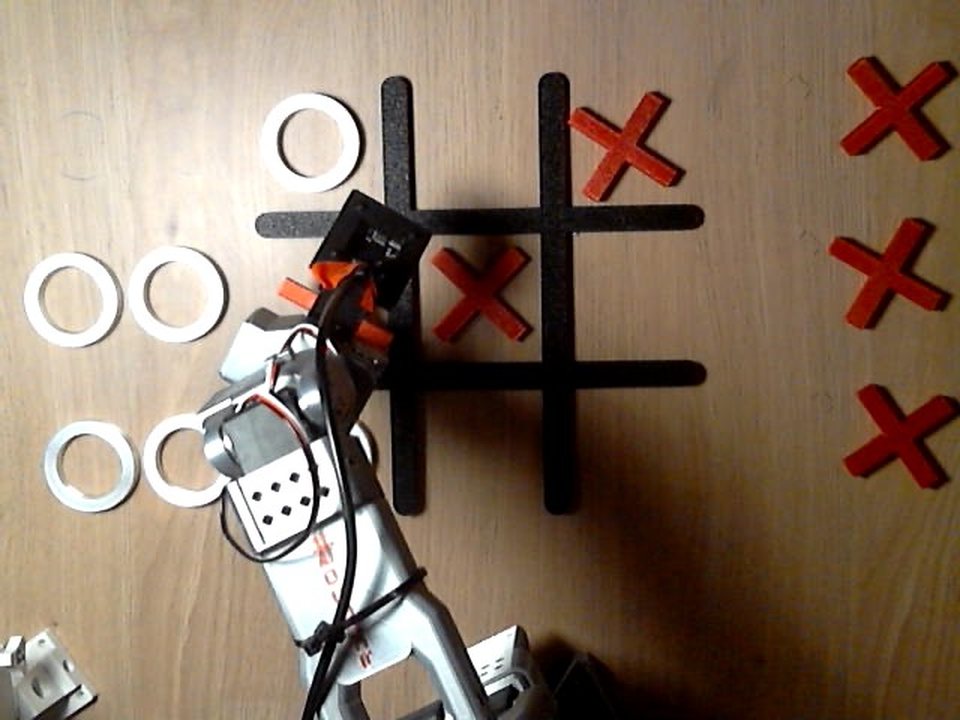
Top camera view of a game: the arm puts a red X in the middle left cell

The third move of a game on 2026-10-10, seen by the camera above the table (rotated so that the arm is at the bottom). I have O in top left and bottom left; Claude picked middle left, and the arm is putting the X there.

I taught an SO-101 robot arm to play tic-tac-toe ("XOX" in Turkish). It plays X, I play O. Claude looks at the board through a camera and picks a cell. The moving is done by SmolVLA, a small neural network that I fine-tuned on 45 moves I showed the arm by hand.

Where it stands, honestly: ten moves on the real arm so far, all ten in the right cell, six of the nine cells tried. That is a pilot, not a success rate.

I wrote these cards for someone who starts from zero. They follow the order I did things in: what you need, the path step by step, and what I would tell a friend before they begin. I did the recording and the playing. The code and the log analysis were written together with Claude Code, an AI coding assistant.

#so101#tic-tac-toe#pilot
●resource

What you need

This is what I used. It is not a shopping list, just what was on my table.

On the table

  • An SO-101 arm pair. The follower is the robot. The leader is the second arm that I move by hand; the follower copies it. That is called teleoperation, and it is how the demonstrations are recorded.
  • Two USB cameras at 640×480, 30 frames per second: one fixed above the board, one on the wrist.
  • A grid made of tape, red X pieces and white ring O pieces, and tape marks for everything that must not move.
  • A Mac. It records the demonstrations and later runs the model.

Accounts

  • Hugging Face, for the dataset and the model.
  • Google Colab with an A100 GPU, for training.
  • An Anthropic API key, for Claude in the game.

Software

  • LeRobot 0.6.1 on Python 3.12: teleoperation, recording, training and running the model.
  • SmolVLA, starting from lerobot/smolvla_base.
  • Strands Agents and Strands Robots: the loop Claude runs in, and the bridge from there to the arm.
  • Claude (claude-opus-5-5), to read the board and pick the cell.

The setup commands are in the README and in docs/strands.md.

#hardware#lerobot#strands
●note

The flow: where I did what

The whole path, in the order I walked it. Every step says where it happens and which file in the repo does it.

Mac + armsrecord
Hugging Faceupload
Colabtrain
Maccheck
armrun and play
  1. Calibrate and teleoperate. Mac, both arms. Calibrate the two arms once, then move the leader and watch the follower copy it. Check which camera is which with lerobot-find-cameras opencv, and that the arm reaches all nine cells. docs/operations.md
  2. Fix the scene. On the table. Tape marks for the grid, the piece slots, the arm base and the top camera, and the same light every time. docs/plan.md
  3. Plan the recordings. Mac. A script draws the start board of every episode, so nothing is improvised at the table. scripts/recording_plan.py writes docs/rounds/round1.md.
  4. Record and check. Mac, both arms. One move per episode with lerobot-record, one target cell per block of five. Then look at every episode. docs/recording.md
  5. Upload. Hugging Face. LeRobot uploads the dataset when a recording call ends. I deleted one bad episode into a clean copy and trained on that. The commands are in the operations notes.
  6. Train. Colab, A100. Open the notebook, add a Hugging Face token, run the cells. About four hours.
  7. Check without the arm. Mac. Load the model, give it recorded frames, change the sentence and see the prediction change. Then run the real command with a port that does not exist.
  8. Run on the arm. Mac, follower. One cell, one sentence, and a log of every command: scripts/rollout_logged.py.
  9. Add Claude and the game. Mac, Anthropic API. First one move without Claude, then a game: scripts/strands_game.py, with the code in xox/ and my notes in docs/strands.md.
  10. Dashboard. Browser on the Mac. A local page with both cameras, the board and a stop button: xox/dashboard.
  11. Measure. Mac. Charts drawn from the logs and the dataset: docs/benchmarks.md, or the measurements card here.

Why this order

Two rules decided the order. Prove the whole chain with a small pilot before recording a lot. And try the model alone on the arm before putting anything on top of it; otherwise I cannot tell whether a fault is in the model or in the bridge.

#steps#repo
●note

Recording: what mattered

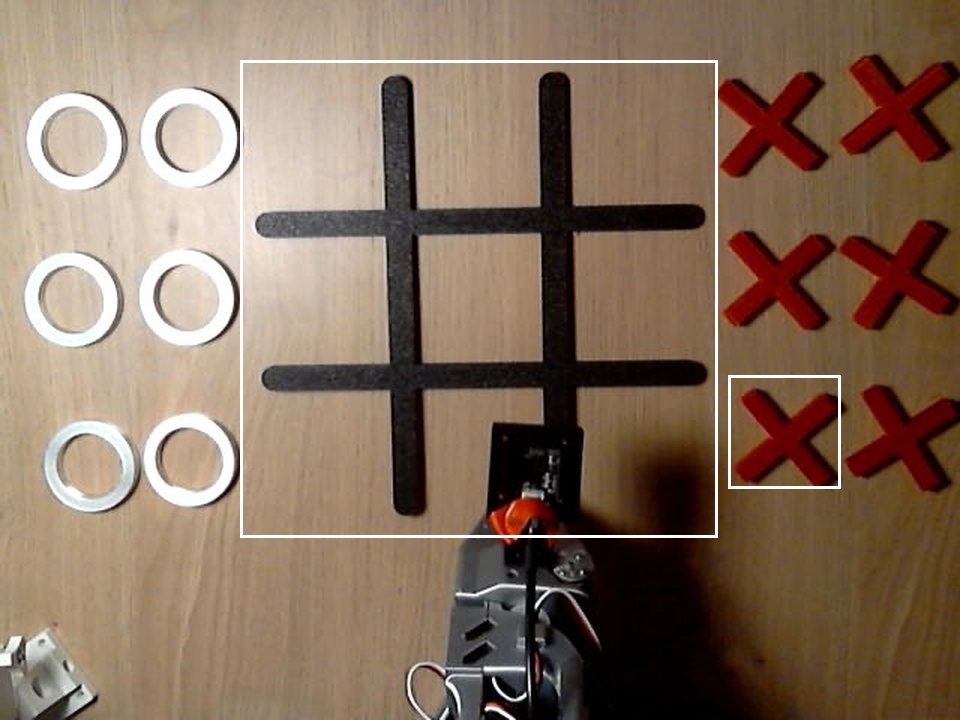
The empty board, the piece stores and the arm at rest, with outlines around the grid and the pick slot

The scene at the start of a game. The small outline is the pick slot; the large one is the area that is cropped and shown to Claude.

I recorded 45 demonstrations, five per cell. Each one is a single move: leave the rest pose, pick the X, put it in the cell, come back. This is what turned out to matter.

  • Nothing moves. The grid, the slots, the arm base and the top camera sit on tape marks, and the light stays the same. The model imitates what it saw and is lost in a scene it has not seen.
  • One pick slot. The X pieces are identical, so the robot always takes one from the same spot and I refill it. Six slots would make 6 × 9 = 54 situations to record instead of nine.
  • Boards as in a real game. If every demonstration starts on an empty board, the arm hits the pieces on a full one. Mine go from empty to all eight other cells filled.
  • Check every episode. Right board, right cell, right label, cameras not swapped. One had 22 motionless seconds at the end, so I recorded it again.
  • Start moving right away. I waited 2.4 seconds on average before I moved, and the model learned to wait.

The clean set has 45 episodes and 28,707 frames, about 16 minutes. That is little: LeRobot's documentation suggests about 50 episodes for a single task, and here 45 are split over nine. The pilot was only meant to prove the chain.

#dataset#teleoperation#lerobot
●experiment

Training

A policy is the function that turns what a robot sees into what it does next. SmolVLA is a small one that takes camera images and a sentence. I did not train it from scratch. I started from lerobot/smolvla_base and fine-tuned it on my 45 episodes with LeRobot's default setting: only the part that produces actions is trained, the vision-language model stays frozen.

The numbers: batch size 64, 20,000 steps, about 3 hours 45 minutes on a Colab A100. The loss went from 0.479 at step 100 down to 0.077. The notebook does all of it and uploads a checkpoint every 5,000 steps, so a dropped connection does not cost the whole run.

Before the model touched the arm I checked three things on the Mac:

  • It loads onto the Mac's GPU and computes 50 steps of motion in 0.35 seconds.
  • On recorded frames its prediction differs from my recorded motion by about 0.4–1° on average. Those are training frames, so this only says it learned its data.
  • On the same frame, swapping the sentence for another cell changes the prediction by up to 50°. The model listens to the sentence.

None of this says the arm will succeed. It rules out the cheap mistakes before the motors are on.

#smolvla#colab#mps
●experiment

On the arm: two traps

The first time I ran the model on the arm, the arm stayed in its rest pose. The second time it waited 6.8 seconds, picked the X, and ran out of time above the cell. The third time it worked, but in jerks. From the second run on I logged every command and joint angle, and the logs showed two traps.

Trap 1: a setting I copied

SmolVLA outputs a chunk at a time: the next 50 joint targets, about 1.7 seconds of motion. I had copied an inference setting from a recipe without measuring it here. It computed each new chunk from an observation 0.6–1 second old and appended it to the old one, so every 50 steps the arm was told to jump back. In the two logged runs with that setting, 17 of the 18 command jumps above 6° sit exactly on a chunk boundary. The largest is 29°, where a normal step is about 1°.

The fix was one flag, --inference.type=sync: finish the chunk, then compute the next. I first compared three settings without the arm, on a fixed image:

Inference settingLargest jumpPause
Queued, as first used31°none
sync6.5°0.4 s every 1.7 s
RTC on13°0.17 s

On the arm with sync, the run started at second 1.3 and the largest jump was 4.6°. It has been the default since.

Per-step change of the commanded pose over time for runs 2, 3 and 4, with chunk boundaries marked, and a table of jump counts

How far the command moved at every step in runs 2 and 3 (queued) and run 4 (sync). The grey lines are chunk boundaries.

Trap 2: my own waiting

In the recordings I waited 2.4 seconds on average before I moved, and the model copied that too. At rest it is undecided between "wait" and "start". This one is in the data, so no flag fixes it. Next round I will move the moment recording starts.

#inference#action-chunk#sync
◐note

Giving it a brain

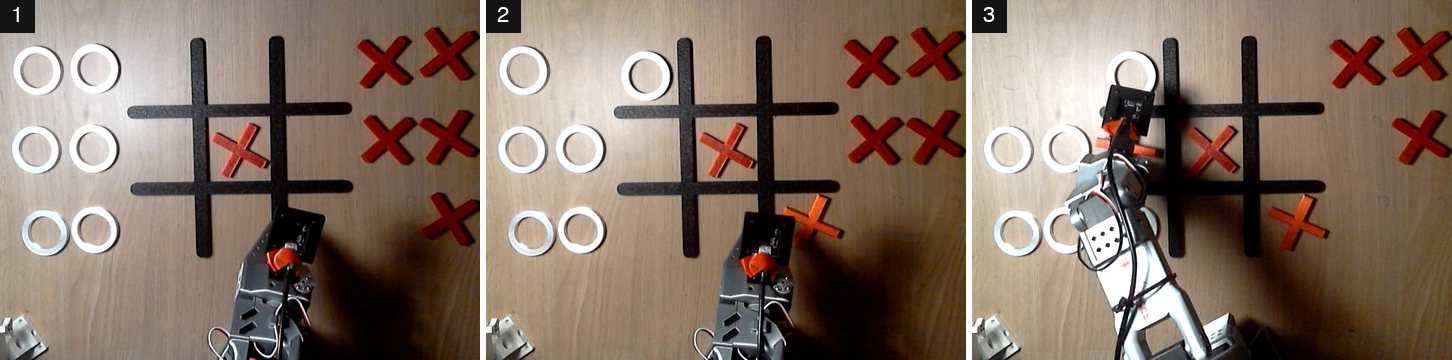
Three top-camera frames of the first game, one per arm move

The first game with Claude, near the end of each of the arm's three moves: middle center, bottom right, middle left.

The model that moves the arm is not smart. It imitates, and in training it saw exactly nine sentences:

put the red X in the {top|middle|bottom} {left|center|right} cell

"Put it in the corner" means nothing to it. So the thinking goes to Claude, and Claude never drives the arm. It gets one tool with one argument, place_x(cell). The code refuses a taken or unknown cell and writes the sentence, letter for letter as in the training data.

top camera
Claude
place_x("top left")
code
"put the red X in the top left cell"
top + wrist camera images, joint angles
SmolVLA policy
arm

Seeing the board. The frame from the top camera is rotated, cropped to the grid and shown to Claude, which reports the nine cells. On eight frames from real runs, each read twice, all 16 reads were correct.

No typing. The code checks the pick slot for a red X, notices when the arm is back at rest, and compares frames locally until a new piece shows up. Only then does Claude read the board again.

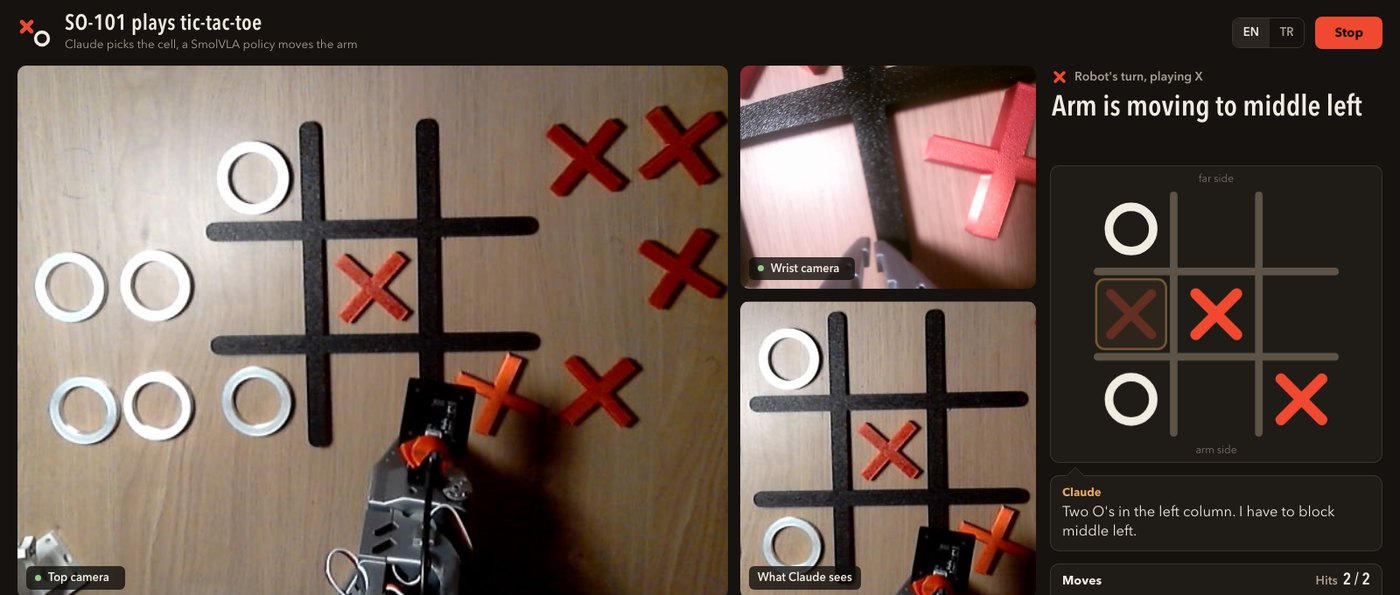
Dashboard. A local page with both cameras, the board and a stop button. The games so far were played from the terminal, so I have only seen it replay a recorded game.

The dashboard with the camera views, the drawn board and the status

The dashboard replaying a recorded game with scripted text. This is not a live game.

The split is not my idea: an earlier open SO-101 tic-tac-toe project was built the same way, and I used it as a reference. The code is in xox/.

#claude#board-reading#dashboard
●note

What I learned

If a friend asked me what to know before starting, I would say this.

  • Prove the chain with a small pilot. 45 episodes were never going to be enough, but they showed that recording, upload, training and the arm all connect.
  • Record what the robot will meet. It does not learn "pick" and "place" as ideas. It imitates, so show it full boards in the scene it will play in.
  • It copies your habits too. I paused before every move, and the model learned to pause.
  • Same motion every time. Same path, same grip, same speed. Delete the bad episodes.
  • Measure before you copy a recipe. One borrowed setting made my arm jump. A log found it, one flag fixed it.
  • Log every command. My first run on the arm was not logged, so there is nothing to look at.
  • Try the model alone first. The plain rollout command, then the game script, then Claude. A fault has fewer places to hide.
  • Type every recording command in full. I reused one from the shell history and labelled three episodes with the wrong sentence.
  • Test without the arm on a port that does not exist. A test of mine once reached the real arm by accident.
  • Keep the language model away from the motors. Claude picks one of nine cells. Code writes the sentence.
  • Count honestly. Ten moves are ten moves, not a success rate.
#lessons#know-how
◐note

Where it stands and what is next

A three by three grid of the board cells with the number of completed moves and how many landed in each

The moves completed on the real arm, per cell, and in how many of them the X ended in the right cell.

Every move that ran to its end put the X in the right cell: ten of ten, over six of the nine cells, at about 17 to 28 seconds a move in the two games. All of it happened on one evening, on the table the data was recorded on, and neither game was played to the end. So I know the chain works. I do not know how often.

To make it better, the first thing I will do is add data.

  • More data. 30–40 episodes per cell instead of five, with full boards, some variation in light, and no waiting at the start of an episode.
  • A real evaluation. Ten trials per cell on board layouts the model has not seen, and a 3×3 success map.
  • A check on Claude. Its choice of cell is not checked yet. A minimax check is planned and not written.
  • The O pieces. Nine more sentences (put the white O in the ... cell) and a pick slot of their own.

The numbers behind this card, with the charts and a list of what has not been measured, are in measurements.

#results#plan
●experiment

Measurements

Four charts drawn from what was already on disk after the evening of 2026-10-10: the command logs of the arm, the frames saved with them, and the joint data of the 45 demonstrations. No run was made for this page and nothing is compared with a baseline, because none was measured.

The numbers are small: three direct policy runs, ten game-script logs, 45 episodes. Points are shown one by one, nothing is fitted, and no chart is a success rate. Every number on this page is in benchmarks/data/key_numbers.csv in the project repository, and every definition is a constant in benchmarks/extract.py; the full page, with two more charts, is docs/benchmarks.md.

Jerky motion: queued against sync
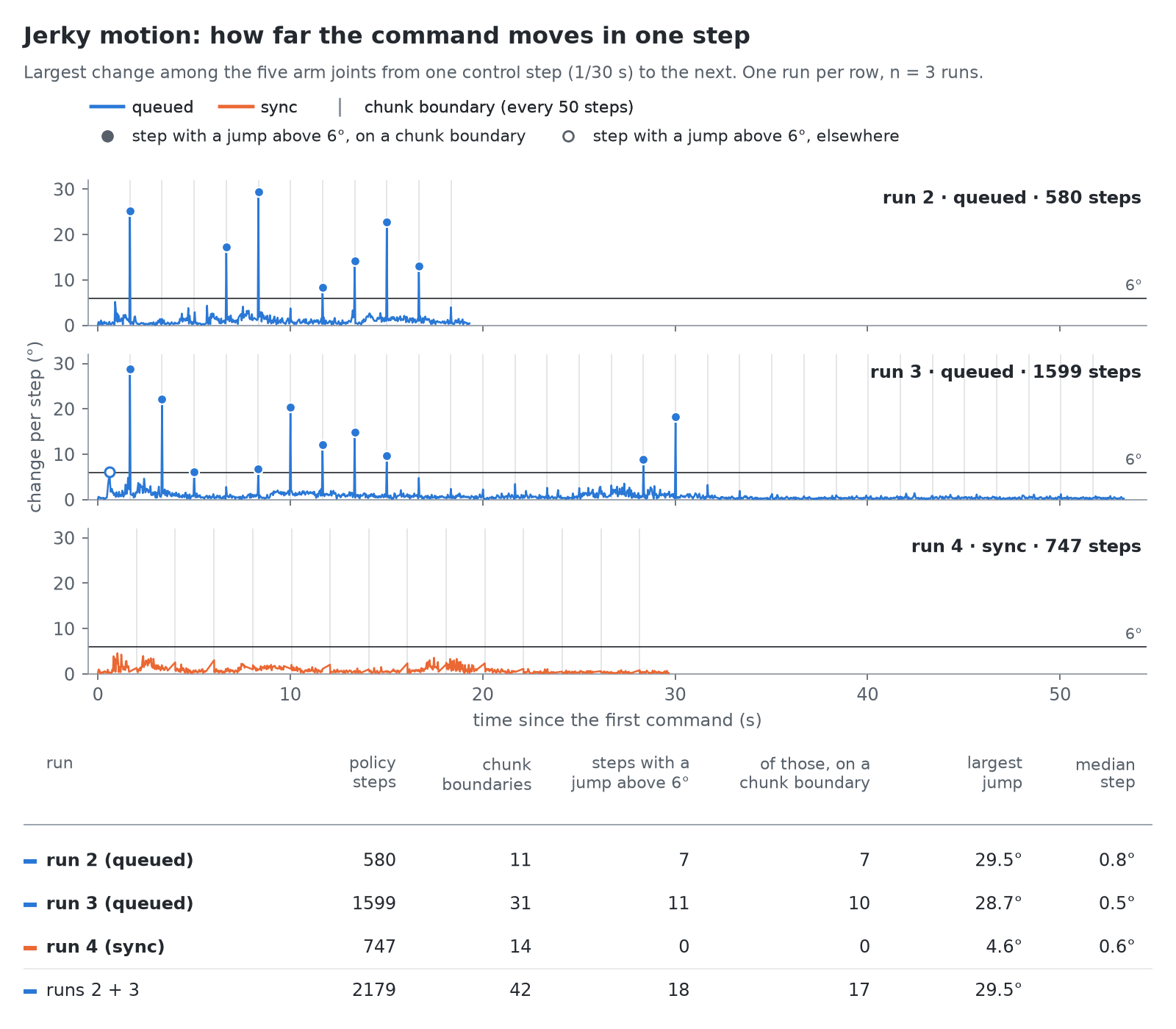
Per-step change of the commanded pose over time for runs 2, 3 and 4, with chunk boundaries marked, and a table of jump counts

For every control step, how far the commanded pose moved since the previous step: the largest change among the five arm joints, in degrees. Runs 2 and 3 used the queued inference setting, run 4 used sync; all three asked for middle center. The grey lines are chunk boundaries, every 50 steps.

What it shows. In the two queued runs, 18 steps jump by more than 6°, and 17 of them sit on a chunk boundary (7 of 7 in run 2, 10 of 11 in run 3). The largest is 29.5°, against a median step of 0.8° and 0.5°. Not every boundary jumps: 17 of the 42 do. In run 4 no step exceeds 6° (the largest is 4.6°); instead the arm pauses for 0.4 s at each of its 14 chunk boundaries, which is why its grey lines are farther apart.

What it does not show. This is one run per row on one evening, with the sync run made last; it is not a controlled comparison and gives no rate at which the queued setting fails. The 6° line is the convention of the write-up, not a property of the arm. The chart shows commands, not motion.

Waiting before the start, and the length of a move
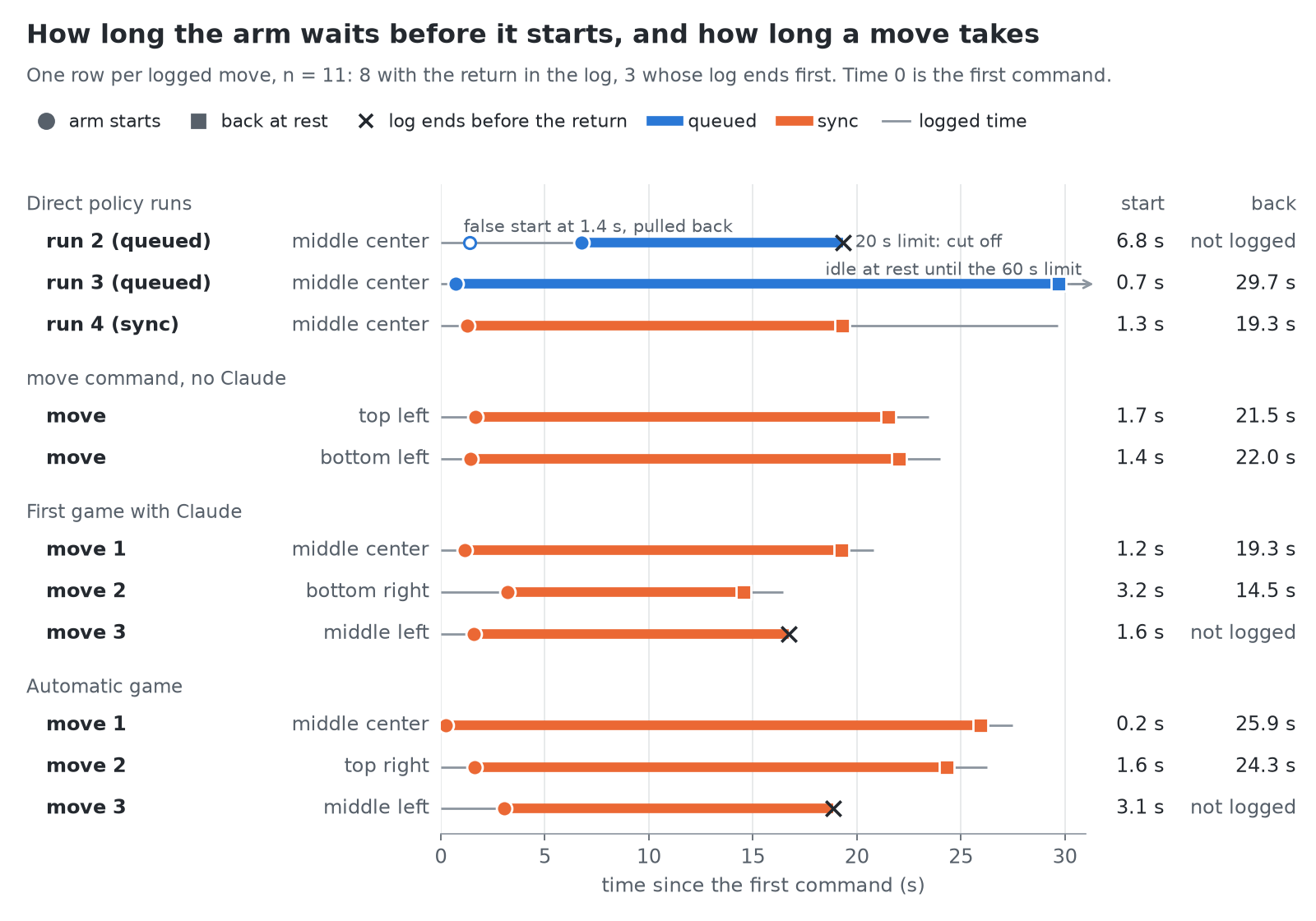
One row per logged move with the time the arm starts and the time it is back at rest, grouped by direct runs, move command and the two games

For 11 logged moves, when the arm starts and when it is back. Time 0 is the first command. The arm has started when the commanded pose of any arm joint is more than 10° from the rest pose; if it is pulled back to rest first, the last departure counts. It is back by the game script's own rule: the first of 45 consecutive commands with shoulder_lift and elbow_flex within 8° of rest.

What it shows. Run 2 (queued) moved at 1.4 s, was pulled back, started at 6.8 s and was cut off by its 20-second limit at 19.3 s with the X still in the gripper. Run 3 (queued) started at 0.7 s and was back at 29.7 s. The 9 sync moves started between 0.2 and 3.2 s (median 1.6 s); the 7 of them whose return is in the log were back between 14.5 and 25.9 s (median 21.5 s). For the third move of each game the log ends 2.3 s and 2.6 s after the gripper was commanded open, with the arm still over the cell, so there is no return time.

What it does not show. It is not a comparison of waiting between the two settings: there are two queued moves, and the wait has a second cause in the data (the chart of the demonstrations, below). The times leave out the first inference before the first command: 0.38 to 0.66 s in the game-script logs, not logged in the direct runs. The game script itself reports longer moves, because it ends a move 1.5 s after the arm is back: 23.4 s and 24.0 s for the two move runs. Three runs are not in the chart: run 1 was not logged, and in two logs the arm never left rest (the accidental run and the run with an empty pick slot).

The demonstrations
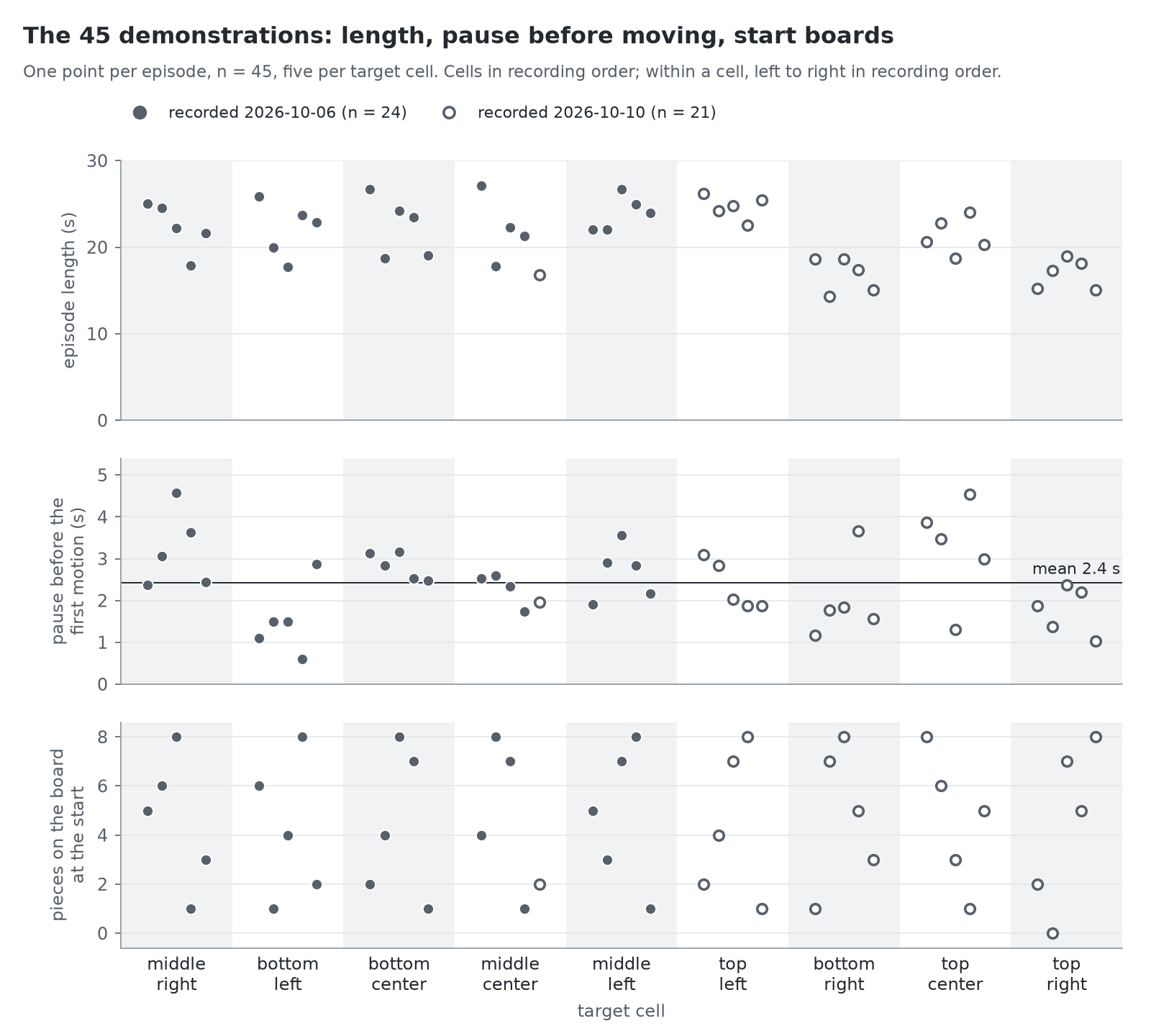
Three panels with one point per episode, by target cell: episode length, pause before the first motion, pieces on the start board

The 45 episodes of the clean training set, from their joint data; the videos were not read. Top: episode length. Middle: the pause before the first motion, defined as the time of the first frame in which any arm joint of the recorded action (the leader arm, so the operator's hand) is more than 3° from its value in the first frame. Bottom: the number of pieces on the start board, from rounds/round1.md.

What it shows. Episodes last from 14.3 to 27.1 s (median 22.0 s). Those recorded on the second day are shorter, with a median of 18.7 s (n = 21) against 22.6 s (n = 24), but not in every cell: top left, recorded on the second day, runs from 22.6 to 26.2 s. The pause before the first motion is 2.4 s on average (median 2.4 s, from 0.6 to 4.6 s), and no episode starts within the first half second. In every cell the start boards go from at most 1 piece to all 8 other cells filled.

What it does not show. Cell and recording day cannot be separated: each cell was recorded in one block on one day, apart from one re-recorded episode. With the measured state of the follower arm instead of the recorded action, the mean pause is the same 2.4 s and the longest is 4.8 s, but 6 episodes then register motion in the first half second, because the follower is still settling. That the policy learned to wait from these pauses is the write-up's reading (first runs on the arm); the chart only shows that the pause is in the data.

Where the arm was asked to go
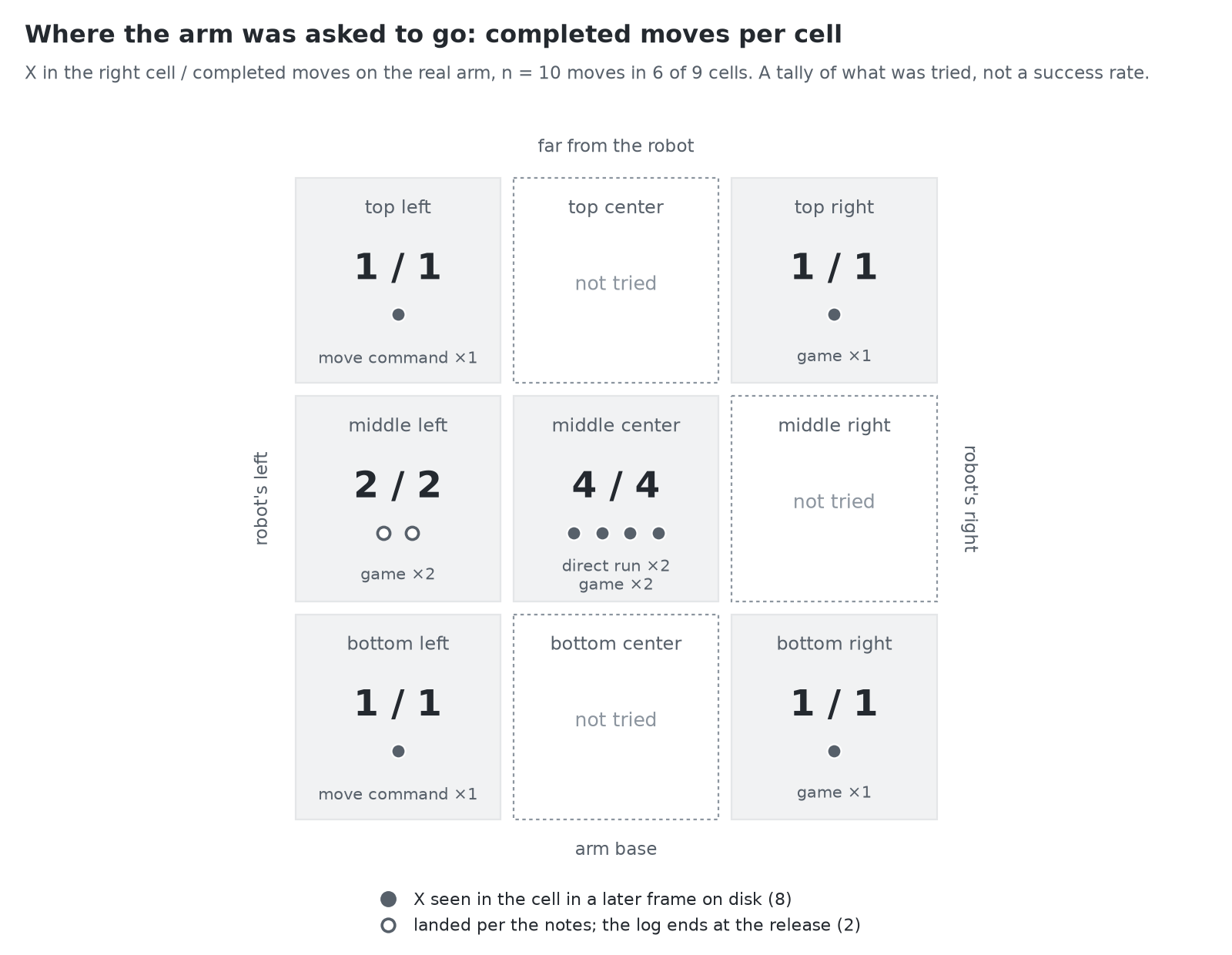
A three by three grid of the board cells with the number of completed moves and how many landed in each

A tally per cell of the moves that the project notes count as completed on the real arm, and in how many of them the X ended in the right cell.

What it shows. 10 moves, 10 in the right cell, over 6 of the 9 cells: middle center four times, middle left twice, four cells once. top center, middle right and bottom center were never tried. For 8 of the 10 moves the X can be seen in the cell in a later frame on disk. For the other 2, the third move of each game, the log ends at the release, and that the X landed rests on the notes of that evening.

What it does not show. This is a tally of what was tried, not a success rate: no cell was tried more than four times, the moves were not planned as trials, and runs that did not complete are left out (run 1, run 2, and the two logs in which the arm never left rest). "In the right cell" was judged by eye, in the automatic game also by Claude reading the board; how well the X is centred was not measured.

What has not been measured

  • A success rate. Ten moves on one evening are a tally. The plan calls for ten trials per cell on start boards held out from training; none of that exists yet, and three cells have not been tried at all.
  • A baseline. No other policy, no earlier checkpoint and no other dataset size was run on the arm. The three inference settings were compared without the arm (the table in first runs on the arm); those numbers are not in the logs on disk and are not redrawn here.
  • Inference time and observation age on the arm. The logs hold commands and joint angles, not when an observation was taken. The 0.4 s pause of sync is visible; the 0.6 to 1 second-old observations of the queued setting are not.
  • Placement accuracy. Whether the X is in the cell was judged by eye. Its position and rotation inside the cell were not measured.
  • Run 1. It was not logged.
  • Robustness. A shifted board, another light, a nearly full board on the arm: not tried. The write-up notes that the board held at most four pieces when the arm moved.
  • Claude's side. Board reading (16 of 16 in the write-up) and the choice of cell need API calls and were not re-run for this page.
  • The detectors in play. Their thresholds were compared with frames from two games. How often they trigger wrongly, or miss, during a game has not been counted.